Peaks#
The peaks of an FOD, as lar peaks writes them, are drawn in the 2D views as short lines through each voxel of
the slice, one per peak, along the peak’s direction. Open the file in the Peaks category.
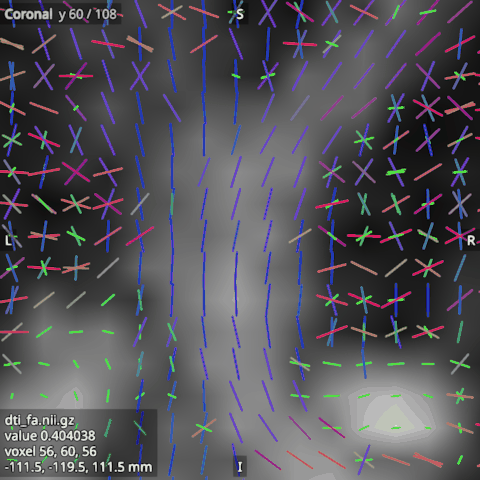
A peaks image is 4D, with 3 volumes per peak: the x, y and z of the peak’s direction, scaled by its amplitude, and NaN where a voxel has fewer peaks. A file whose number of volumes is not a multiple of 3 is refused.
Their options#
Scale: the lines’ length; at 1, the image’s largest peak spans one voxel.
Length by amplitude: on, a line’s length follows its peak’s amplitude; off, every line has the same length, which shows the directions alone.
Threshold: a share of the image’s largest amplitude; a peak below it is not drawn.
Asymmetric peaks: on, each peak is drawn from the voxel centre outwards only, half as long, so a peak and its opposite together span what one line spans when off. Turn it on for the peaks of an asymmetric FOD, where a peak and its opposite are two lobes and a lobe on one side only must not look like a straight fibre. A peaks file does not say whether its signs matter, so the option is off for a new peaks image; from Python or an agent,
viewer.set_default(Category.PEAKS, OptionName.ASYMMETRIC_PEAKS, True)before opening a file turns it on from the start.Line width (px): the lines’ width on the screen.
Colouring: by direction (red left to right, green front to back, blue up and down), or in a single colour (the Colour option).