
FOD glyphs#
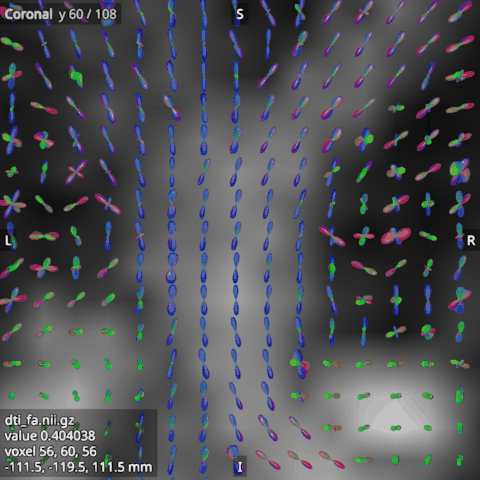
A fibre orientation distribution (FOD) is a 4D image of spherical harmonic (SH) coefficients, such as MRtrix’s
wmfod.mif. Open it in the FODs category. In the 2D views it is drawn as a glyph per voxel of the slice:
the FOD’s amplitude in every direction, coloured by direction (red left to right, green front to back, blue up
and down).
Symmetric and asymmetric#
A symmetric FOD has the same lobe at both ends of each fibre and uses the even degrees only: (lmax + 1)(lmax + 2) / 2 coefficients, 45 for lmax 8. An asymmetric FOD uses all degrees, (lmax + 1)² coefficients, 81 for lmax 8, and can have a lobe at one end only. The viewer tells the two apart by the number of coefficients; a file with neither number is refused.
Their options#
Basis: the SH basis of the coefficients, which the file does not record: tournier (MRtrix’s, the default), descoteaux, or leemans (ExploreDTI’s).
Scale: the glyphs’ size; at 1, the largest lobe reaches the edge of its voxel.
Scaling: per_voxel, each glyph scaled on its own, so round FODs look as large as sharp ones; or whole_image, by the image’s largest amplitude, so the size shows the amplitude.
Threshold: a share of the image’s largest amplitude; a voxel whose largest amplitude is below it gets no glyph. It starts at 0.1, which leaves out the background’s small noise.
Minimum anisotropy: 0 for a round FOD, near 1 for a sharp one. Raising it hides the round FODs of grey matter and CSF.
Sphere detail: how smooth each glyph is, 8 by default; higher is smoother and slower.
Colouring: by direction, or in a single colour (the Colour option).
One FOD, large#
To look at one voxel’s FOD closely, select the FOD in Layers and press Inspect FOD in its options (or F, or Ctrl+4, or its icon on the right). The Inspect FOD panel shows the FOD at the crosshair as one large, smooth glyph, with the R/L, A/P and S/I axes, and follows the crosshair as you click around. Drag to turn it, use the wheel to zoom, and Reset view to start again. It uses the FOD’s basis and colouring, but not the threshold, the minimum anisotropy or the scale, so it always shows the whole FOD. Outside the FOD’s grid it says there is no FOD there. The panel follows the FOD selected in Layers, and keeps the last one while another kind of item is selected.